Записи с пометкой ·

Delphi-En

·...

DelphiAST Announce

In this post I would like to announce DelphiAST project.

DelphiAST is built on the top of publically available version of CastaliaDelphiParser which was much improved (see SimpleParser directory). I fixed a number of issues, added new syntax support and so forth.

With DelphiAST you can take real Delphi code and get an abstract syntax tree. One unit at time and without a symbol table though. Take a look at the sample code to see how it works.

This is a part of my effort to build a static analysis tool for Delphi. I decided to publish this under MPL 2.0 licence as my contribution to the community. I hope the community will contribute to this project too :)

Behavior Driven Development in Delphi

In this Skill Sprint I introduce behavior driven development principles, tell a few words about Gherkin language and demonstrate how this can be applied to Delphi programming.

August 12, 2014
6AM San Francisco / 9AM New York / 2PM London / 3PM Milan
11AM San Francisco / 2PM New York / 7PM London / 8PM Milan
5PM San Francisco / Wed & Fri 9AM Tokyo / Wed & Fri 10AM Sydney

Click here to register now for Skill Sprints.

Slides and links from this Skill Sprint:

DelphiSpec

Samples

Gherkin

Blog Posts

DelphiSpec grows

Even though I didn’t have much time lately, I managed to do some significant progress with DelphiSpec library over the last couple of weeks. Some features were introduced in my previous post, now please let me introduce new features.

First of all, there is a new quite cosmetic, but very convenient and nice feature — now it is possible to declare step definitions without the use of attributes (special thanks to Stefan Glienke).

In the previous post I showed you this syntax:

    // sample scenario: "Given user ROOT exists"    
    [Given_('user (.*) exists')]
    procedure MyProcName(const Name: string);

Though this still works, now it’s possible to do the same without attributes at all:

 
    // sample scenario: "Given user ROOT exists"
    procedure Given_user_name_exists(const Name: string);

Thus you can use method name to declare step type and pattern. It is less flexible, but sometimes it is more convenient.

Also not only the string type is supported. This will work fine:

 
    // sample scenario: "Given I have 3 apples"
    procedure Given_I_have_N_apples(N: Integer);

You are even allowed to pass an array:

 
    // sample scenario: "Given I have a list 1,2,3,4"
    procedure Given_I_have_a_list_Ns(Ns: TArray<Integer>);

Or even array of records:

 
type   
  TUserInfo = record
    Name: string;
    Password: string;
    Id: Integer;
  end;

  // sample scenario
  // Given users exist:
  //  | id | name  | password |
  //  | 1  | Roman | pass1    |  
  //  | 2  | Other | pass2    |
  procedure Given_users_exist(Table: TArray<TUserInfo>);

Last example demonstrates a cool Gherkin data type — data table. Please note that this table is passed to a step definition method as a dynamic array of typed records. All type casting stuff is done by DelphiSpec and you don’t have to think about it… It is RTTI magic :)

One more type that Gherkin has and DelphiSpec supports is python-like multi-line strings. This kind of string is enclosed by three quotes and is passed to a step definition method as a regular Delphi string:

 Given I have a blacklist:
   """
   m@mail.com
   123@mail.com
   """

Besides there are a couple more interesting features.

Background allows you to add some context to all scenarios in a single feature. A Background is like an untitled scenario, containing a number of steps. The difference is when it is run: the background is run before each of your scenarios.

Feature: Accounts

Background:
  Given users exist:
    | id | name  | password |
    | 1  | Roman | pass1    |  
    | 2  | Other | pass2    |

Scenario: Correct Login
  Given my name is "Roman"
    And my password is "pass1"
  When I login
  Then I have access to private messages

Scenario: Incorrect Login
  Given my name is "Roman"
    And my password is "pass2"
  When I login
  Then access denied

Also now you can not only describe a single scenario, but a more general Scenario outline:

Scenario Outline: Add two numbers
  Given I have entered <num1> in calculator
    And I have entered <num2> in calculator
  When I press Add
  Then the result should be <sum> on the screen
  
  Examples:
    | num1 | num2 | sum |
    |  1   |  2   |  3  | 
    |  4   |  5   |  9  |
    |  3   |  1   |  4  |

The Scenario outline steps provide a template which never run directly. A Scenario Outline is run once for each row in the Examples section beneath it. The Scenario Outline uses placeholders, which are contained within angle brackets in the Scenario Outline’s steps

This is how a Scenario outline is showed in DUnit test tree:
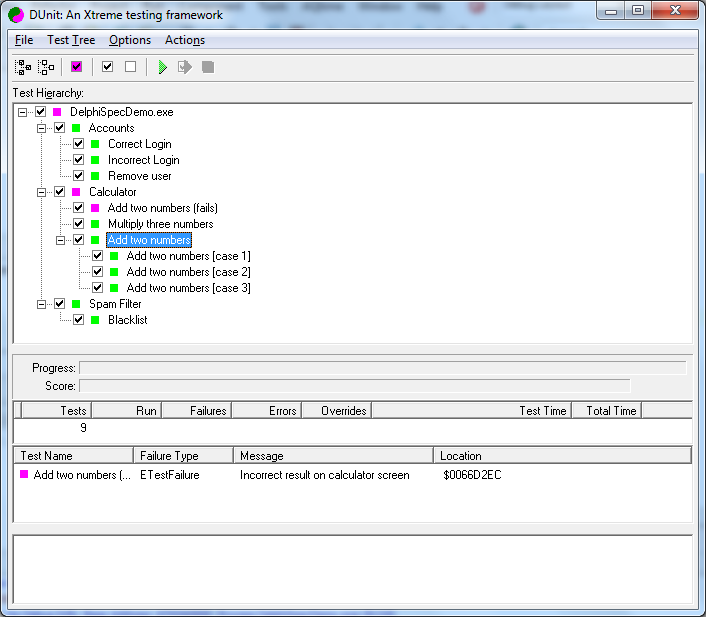
«Add two numbers» has a single test for each case.

Full demo code is available on github. A plan for the future is to implement bindings to DUnitX and support both DUnit and DUnitX.
DelphiSpec Library Announce

Martin Fowler:

That said, I do think that the greatest potential benefit of DSLs comes when business people participate directly in the writing of the DSL code. The sweet spot, however is in making DSLs business-readable rather than business-writeable. If business people are able to look at the DSL code and understand it, then we can build a deep and rich communication channel between software development and the underlying domain.

In this post I’d like to announce DelphiSpec library. It was inspired by Cucumber. Actually, this library is the implementation of Gherkin language in Delphi. This implementation is not complete (consider it as an alpha version). Some features haven’t been implemented yet, but this project is still in development.

In a few words, the essence of the project is that DelphiSpec allows to turn the scenario into the appropriate unit test for DUnit:

Feature: Calculator

Scenario: Add two numbers
  Given I have entered 50 in calculator
    And I have entered 70 in calculator
  When I press Add
  Then the result should be 120 on the screen

Scenario: Add two numbers (fails)
  Given I have entered 50 in calculator
    And I have entered 50 in calculator
  When I press Add
  Then the result should be 120 on the screen

Scenario: Multiply three numbers
  Given I have entered 5 in calculator
    And I have entered 5 in calculator
    And I have entered 4 in calculator
  WHEN I press mul
  Then the result should be 100 on the screen

I’ll underline that these are not tests but scenarios. In other words, this is the Behavior-Driven Development (BDD) in addition to the famous Test-Driven Development (TDD). Such scenarios serve as documentation, automated tests and development-aid — all rolled into one format. You should not describe internal system logic using scenarios: they should describe how user sees an application behavior.

Use of Gherkin is a good choice for DelphiSpec because it’s now considered as de-facto standard in the particular niche and if you took interest in it you can even buy a book with the best practices, tips on writing scenarios and examples in this language. Also there is lots of information on the Internet.

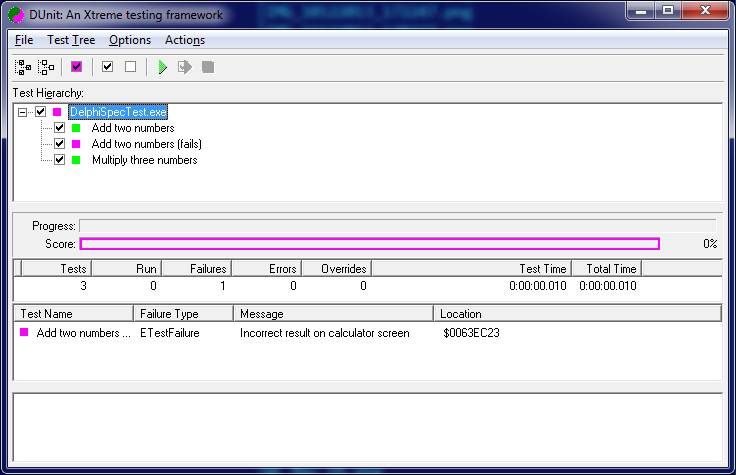
Let’s return to the example (the Calculator). The scenarios execution result in DUnit will look like:

How does this work? Gherkin is very small itself. Actually its only aim is to describe Given-When-Then formula. There are several keywords, all the rest could be customized.

We test a very simple class: a calculator. I will not post its code here, you can find it on github. The interesting thing is: how will the program understand and execute commands like “Given I have entered 50 in calculator”? Here comes the helper class which describes these steps (so-called «step definitions»). This is the helper class itself:

unit SampleCalculatorStepDefs;
 
interface
 
uses
  SampleCalculator, DelphiSpec.Attributes, DelphiSpec.StepDefinitions;
 
type
  [_Feature('calculator')]
  TSampleCalculatorSteps = class(TStepDefinitions)
  private
    FCalc: TCalculator;
  public
    procedure SetUp; override;
    procedure TearDown; override;
 
    [_Given('I have entered (.*) in calculator')]
    procedure EnterInt(Value: string);
 
    [_When('I press Add')]
    procedure AddInt;
 
    [_When('I press Mul')]
    procedure MulInt;
 
    [_Then('the result should be (.*) on the screen')]
    procedure TestResult(Value: string);
  end;
 
implementation
 
uses
  System.SysUtils, TestFramework, DelphiSpec.Core;
 
{ TSampleCalculatorSteps }
 
procedure TSampleCalculatorSteps.AddInt;
begin
  FCalc.Add;
end;
 
procedure TSampleCalculatorSteps.EnterInt(Value: string);
begin
  FCalc.Push(Value.ToInteger);
end;
 
procedure TSampleCalculatorSteps.MulInt;
begin
  FCalc.Mul;
end;
 
procedure TSampleCalculatorSteps.SetUp;
begin
  FCalc := TCalculator.Create;
end;
 
procedure TSampleCalculatorSteps.TearDown;
begin
  FCalc.Free;
end;
 
procedure TSampleCalculatorSteps.TestResult(Value: string);
begin
  if FCalc.Value <> Value.ToInteger then
    raise ETestFailure.Create('Incorrect result on calculator screen');
end;
 
initialization
  RegisterStepDefinitionsClass(TSampleCalculatorSteps);
 
end.

In fact, every step has a type (Given/When/Then) and the regular expression that describes the rest part of the step. Regular expressions help to extract the parameters which will be passed to the class methods to perform the relevant part of the scenario.

The only thing we need to do so that this system works is to add into project file (.dpr) the procedure call which receives the path to a folder which contains “.feature” files to process.

begin
  PrepareDelphiSpecs(TPath.Combine(ExtractFilePath(Application.ExeName), 'features'), True, 'EN');
  DUnitTestRunner.RunRegisteredTests;
end.

The last parameter (“EN”) allows us to specify a language in which we write the script. This is another interesting Gherkin possibility. Since, generally, there is no difference in what language the text is processed using regular expressions; it would be a good idea to translate a few keywords into different languages (using this XML).

So nothing prevents us from writting scenarios in any language:

Функционал: Калькулятор

Сценарий: Сложить два числа
  Допустим я ввожу 50 на калькуляторе
         И я ввожу 70 на калькуляторе
  Когда я нажимаю СЛОЖИТЬ
  Тогда результат на экране должен быть 120

These are the very first steps, but I’m planning to implement full Gherkin functionality.

P.S. There are some comments in G+: https://plus.google.com/u/0/+RomanYankovsky/posts/2S789T49dX8

Delphi XE5: modal forms are not modal?

A couple of months ago Marco Cantu told us that modal forms are not directly supported on Android and we could use a new overloaded version of the same method:

    function ShowModal: TModalResult; overload;
    procedure ShowModal(const ResultProc: TProc<TModalResult>); overload;

First method does raise an exception on Android and the second can be used as follows.
This classic code:

var
  dlg: TForm1;
begin
  dlg := TForm1.Create(nil);
  try
    // select current value, if avaialble in the list
    dlg.ListBox1.ItemIndex := dlg.ListBox1.Items.IndexOf(edit1.Text);
    if dlg.ShowModal = mrOK then
      // if OK was pressed and an item is selected, pick it
      if dlg.ListBox1.ItemIndex >= 0 then
        edit1.Text := dlg.ListBox1.Items [dlg.ListBox1.ItemIndex];
  finally
    dlg.Free;
  end;
end;

should be rewritten using the new approach:

var
  dlg: TForm1;
begin
  dlg := TForm1.Create(nil);
  // select current value, if avaialble in the list
  dlg.ListBox1.ItemIndex := dlg.ListBox1.Items.IndexOf(Edit1.Text);
  dlg.ShowModal(
    procedure(ModalResult: TModalResult)
    begin
      if ModalResult = mrOK then
      // if OK was pressed and an item is selected, pick it
        if dlg.ListBox1.ItemIndex >= 0 then
          edit1.Text := dlg.ListBox1.Items [dlg.ListBox1.ItemIndex];
      dlg.DisposeOf;
    end);
end;

The idea is clear and the motivation is clear. It uses an anonymous method with the code to be executed when the «supposedly modal» form is closed. This code works on all platforms. Thanks, Marco!

But let’s take a deeper look inside this new ShowModal:

procedure TCommonCustomForm.ShowModal(const ResultProc: TProc<TModalResult>);
begin
  FResultProc := ResultProc;
  Show;
end;

The form will be not modal on any platform! Thus, if we are going to write cross-platform code, we are suggested either to use conditional compilation or to stop using modal forms at all. Seriously?

Here is the pattern that I often use in my code:

with TForm1.Create(nil) do
try
  ShowModal;
finally
  Free;
end;

Taking into account new ShowModal approach, this code can be rewritten as follows:

var
  Frm: TForm1;
begin
  Frm := TForm1.Create(nil);
  ShowModal(procedure (Res: TModalResult) begin Frm.DisposeOf; end);
end;

It works fine on all platforms, but the form is not modal anymore! So the best option for me would be:

var
  Frm: TForm1;
begin
  Frm := TForm1.Create(nil);
  {$IFDEF ANDROID}
    Frm.ShowModal(procedure (Res: TModalResult) begin end);
  {$ELSE}
    try
      Frm.ShowModal;
    finally
      Frm.Free;
    end;
  {$ENDIF}
end;

The form will be «pseudomodal» on Android and truly modal on other platforms. It’s better than nothing, but I hesitate to use IFDEFs too often — usually I have more than a couple of forms.

Finally, I have two rhetorical questions.

Why was new ShowModal approach not implemented like this:

procedure TCommonCustomForm.ShowModal(const ResultProc: TProc<TModalResult>);
begin
  {$IFDEF ANDROID}
    FResultProc := ResultProc;
    Show;
  {$ELSE}
    ResultProc(ShowModal);
  {$ENDIF}
end;

?

If this is not suitable for some reason, why did you call this method ShowModal, it has nothing to do with modal forms though?

Using TCanvas in Delphi for Android

Drawing on TCanvas in Delphi XE5 for Android turned out to have some special aspects which at first left me in doubt and I want to share my experience.

Let’s draw some parallel lines.

Here I’d like to digress and notice that on Windows Stroke.Kind value is bkSolid by default, but on Android it’s bkNone. Thus, if you haven’t defined Stroke.Kind value, these lines will be visible on Windows, but will not on Android. I have no idea why they chose this approach.

procedure TForm2.FormPaint(Sender: TObject; Canvas: TCanvas;
  const ARect: TRectF);
var
  I: Integer;
begin
  if Canvas.BeginScene then
    try
      Canvas.Stroke.Thickness := 1.5;
      Canvas.Stroke.Kind := TBrushKind.bkSolid;
      Canvas.Fill.Color := TAlphaColorRec.Black;
      Canvas.Fill.Kind := TBrushKind.bkSolid;

      for I := 1 to 9 do
        Canvas.DrawLine(PointF(50 + I * 25, 0), PointF(50 + I * 25, ClientHeight), 1);
    finally
      Canvas.EndScene;
    end;
end;

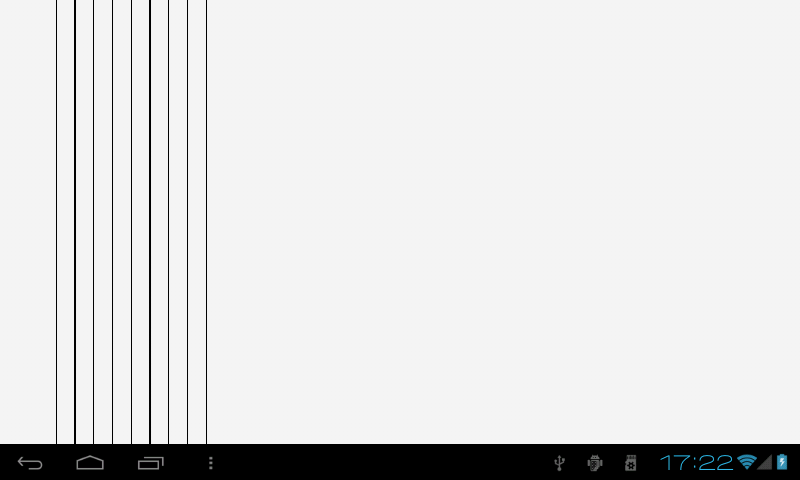
That’s it:

Obviously, some lines are thicker than others. On Windows the same code works just perfectly.

The reason is that unlike it does on Windows, the logical pixel on Android is not always equal to physical pixel. And if a line appears to be «between» physical pixels, it has to be blurred on neighboring pixels. It is a trade-off between accuracy and quality of rendering.

If we still want to draw equal lines, we could move them by the half of their thikness to ensure getting the appropriate physical pixels.

That’s how TLine and its ancestor TShape solve the problem:

function TShape.GetShapeRect: TRectF;
begin
  Result := LocalRect;
  if FStroke.Kind <> TBrushKind.bkNone then
    InflateRect(Result, -(FStroke.Thickness / 2), -(FStroke.Thickness / 2));
end;

procedure TLine.Paint;
begin
  case FLineType of
    TLineType.ltTop:
      Canvas.DrawLine(GetShapeRect.TopLeft, PointF(GetShapeRect.Right, GetShapeRect.Top),
        AbsoluteOpacity, FStroke);
    TLineType.ltLeft:
      Canvas.DrawLine(GetShapeRect.TopLeft, PointF(GetShapeRect.Left, GetShapeRect.Bottom),
        AbsoluteOpacity, FStroke);
  else
    Canvas.DrawLine(GetShapeRect.TopLeft, GetShapeRect.BottomRight, AbsoluteOpacity, FStroke);
  end;
end;

Making the appropriate changes we can draw equal lines too:

procedure TForm2.FormPaint(Sender: TObject; Canvas: TCanvas;
  const ARect: TRectF);
var
  I: Integer;
begin
  if Canvas.BeginScene then
    try
      Canvas.Stroke.Thickness := 1.5;
      Canvas.Stroke.Kind := TBrushKind.bkSolid;
      Canvas.Fill.Color := TAlphaColorRec.Black;
      Canvas.Fill.Kind := TBrushKind.bkSolid;

      for I := 1 to 9 do
      begin
        Canvas.DrawLine(PointF(50 + I * 25 - (Canvas.Stroke.Thickness / 2), 0),
          PointF(50 + I * 25 - (Canvas.Stroke.Thickness / 2), ClientHeight), 1);
      end;
    finally
      Canvas.EndScene;
    end;
end;

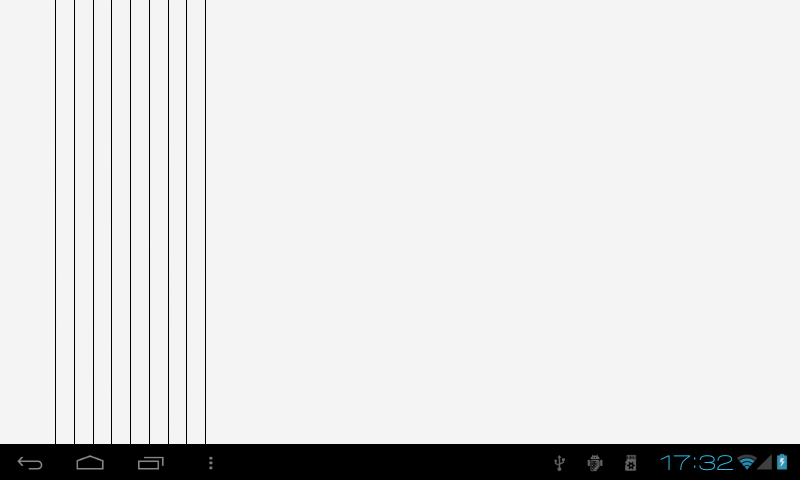
The result is:

Much better :)

This can’t be done automatically: in this case it will «jump» during an animation. But anyways I’d like to have some flag to choose between accuracy and quality. It’s quite boring to do this calculation manually.

update

Alysson Cunha suggests one more approach:

function TForm2.RoundLogicPointsToMatchPixel(const LogicPoints: Single;
  const AtLeastOnePixel: Boolean = False): Single;
var
  ws: IFMXWindowService;
  ScreenScale, Pixels: Single;
begin
  ws := TPlatformServices.Current.GetPlatformService(IFMXWindowService) as IFMXWindowService;
  ScreenScale := ws.GetWindowScale(Self);

  // Maybe you will want to use Ceil or Trunc instead of Round
  Pixels := Round(LogicPoints * ScreenScale);

  if (Pixels < 1) and (AtLeastOnePixel) then
    Pixels := 1.0;

  Result := Pixels / ScreenScale;
end;

procedure TForm2.FormPaint(Sender: TObject; Canvas: TCanvas;
  const ARect: TRectF);
var
  I: Integer;
begin
  if Canvas.BeginScene then
    try
      Canvas.Stroke.Thickness := RoundLogicPointsToMatchPixel(1.0, True);
      Canvas.Stroke.Kind := TBrushKind.bkSolid;
      Canvas.Fill.Color := TAlphaColorRec.Black;
      Canvas.Fill.Kind := TBrushKind.bkSolid;

      for I := 1 to 9 do
        Canvas.DrawLine(PointF(RoundLogicPointsToMatchPixel(50 + I * 25), 0),
          PointF(RoundLogicPointsToMatchPixel(50 + I * 25), ClientHeight), 1);
    finally
      Canvas.EndScene;
    end;
end;